The difference between a group that comes back every year and one that never returns usually has nothing to do with your rooms. It comes down to the experience.
Group bookings carry more moving parts than any other segment: multiple rooms, multiple guests, multiple points of contact, and expectations that span every department. When the coordination works, groups don’t just return, they refer. When it doesn’t, you’ll never hear from them again.
Here are 22 practical ideas to improve your group guest experience across every stage of the guest journey, with the technology that makes each one achievable.
Understanding what makes groups different
Before you build a strategy, it helps to understand what actually separates a group stay from an individual one.
The obvious answer is volume: more rooms, more guests. But the more meaningful difference is coordination complexity.
A group usually has a coordinator or event planner who is responsible for the experience of every member. That person is your real customer. When they feel confident that details are handled, room assignments are correct, billing is clear, and communication is consistent, the group experience works.
When they’re spending their weekend chasing down rooming lists and sorting out folio disputes, you’ve failed them.
Your goal is to make the coordinator’s job as easy as possible at every stage, while delivering individual experiences that make each group member feel like they were expected and welcomed.
22 ideas to improve the group experience
Pick and choose the ideas that make the most sense in each phase of the guest journey based on your group segments.
Discovery: Making it easy to find and choose you
The group guest experience starts before anyone has booked a room.
1. Build a dedicated groups and events page on your website
Event planners research properties thoroughly before reaching out or sending an RFP. Your website is your first pitch. A dedicated groups page should clearly state:
- The types of groups you host (weddings, corporate retreats, conferences, sports teams)
- Meeting space and event space specs with capacity charts
- Room block options and how the booking process works
- Food and beverage options and minimums
- Contact information for your sales team and how to submit an RFP or inquiry
The more specific and usable this page is, the fewer irrelevant inquiries you’ll field and the more qualified leads you’ll convert.
2. Add a group booking URL to your booking engine
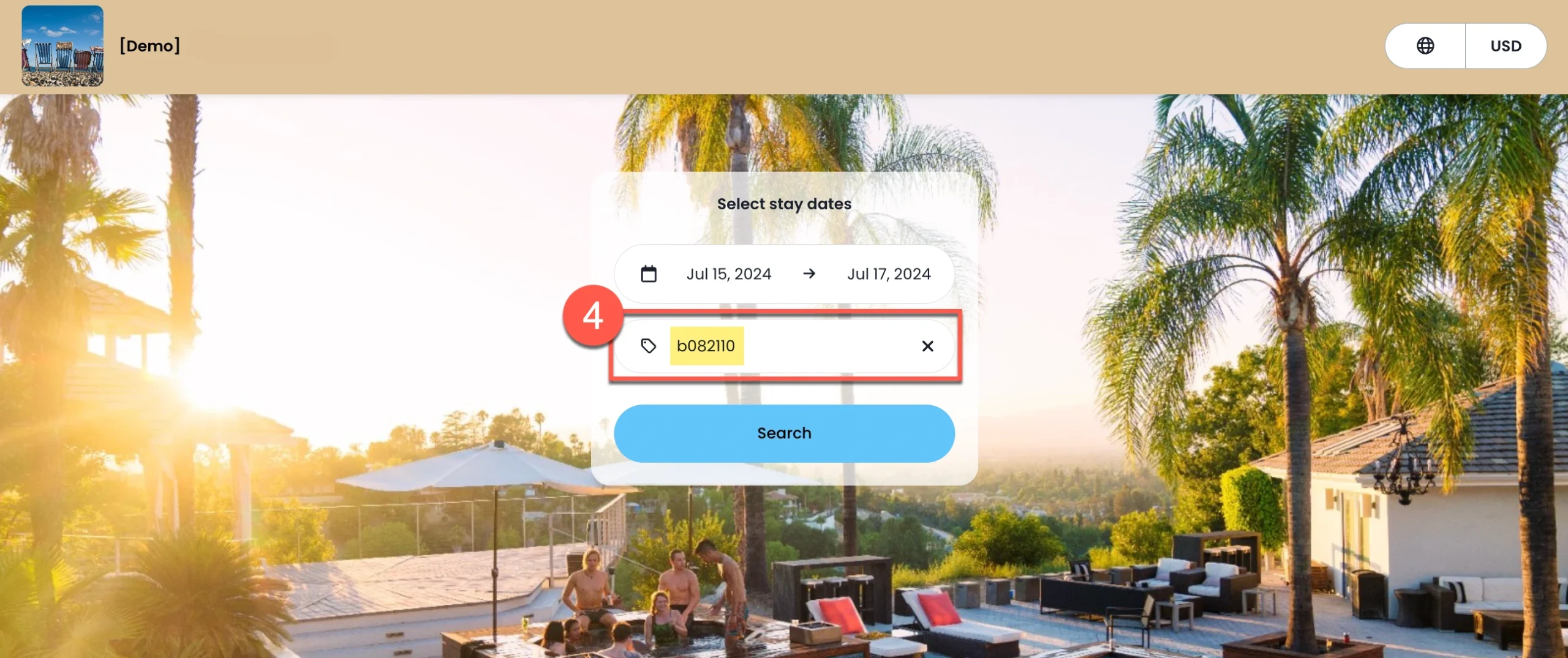
Nothing slows down a group booking faster than asking guests to call the front desk, enter promo codes manually, or email back and forth just to secure their room. A dedicated group booking URL removes that friction by sending guests directly to your booking engine with the correct rates, dates, and room block already applied.
With Cloudbeds, accepted quotes automatically generate a unique booking link that coordinators can share with group members, allowing each guest to book independently while keeping the entire block direct, organized, and easy to track.
3. Connect to venue marketplaces and RFP platforms
Listing your property on Cvent and similar platforms expands your visibility to planners who are actively sourcing. Keep your profile current, including photos, room specs, meeting space capacity, sustainability credentials, and direct sales contact so planners can qualify your property quickly and get in touch without friction.
Pre-arrival: Setting up for a smooth experience
The pre-arrival stage is where most hotels underinvest and where the biggest operational gains are available.
4. Assign a dedicated point of contact
For any group booking with meaningful size or complexity, assign a single point of contact — an event manager or group coordinator on your side — who owns the relationship from contract signing to checkout. Communicate this contact’s name and direct details to the group coordinator as early as possible.
Knowing there’s one person responsible, and who that person is, immediately reduces the coordinator’s anxiety. It also prevents the fragmented communication that leads to errors: when one person owns the group, nothing falls through the cracks between departments.
5. Use pre-arrival communications strategically
Pre-arrival messaging is your chance to gather information, set expectations, and personalize the experience before the group arrives and the complexity peaks.
A well-timed pre-arrival sequence might include:
- Two weeks out: confirmation of room assignments, check-in process, and any group-specific logistics
- One week out: reminder of check-in time, parking, group event schedule if applicable, and any upsell offers
- Day before: final details including check-in instructions, wifi, and key contact information
Use this window to collect any outstanding preferences like dietary restrictions, room configuration requests, or accessibility needs so your team can prepare rather than scramble.
6. Use a digital rooming list
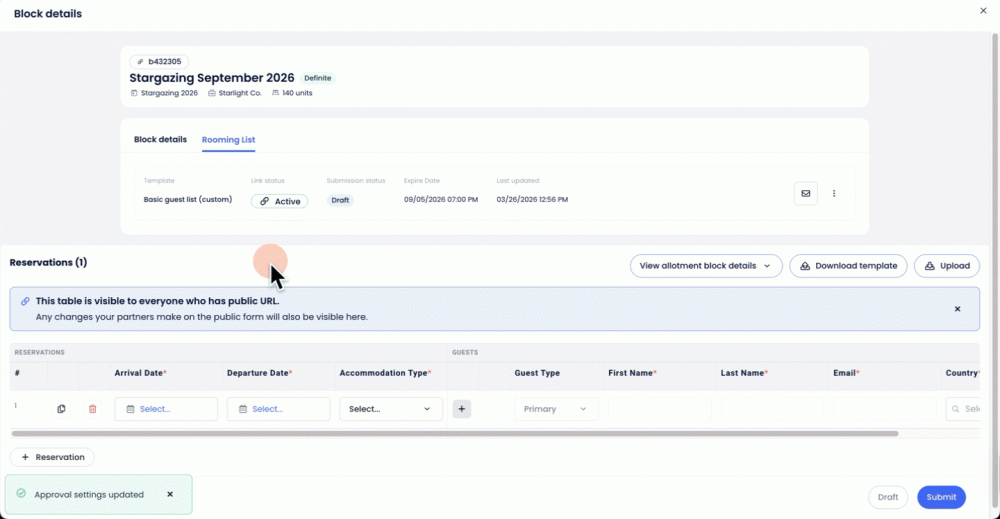
Collecting guest details for a large room block is one of the most time-consuming parts of group management, and one of the easiest places for errors to creep in. Emailed spreadsheets, missing guest information, and last-minute room changes create unnecessary back-and-forth for both your team and the group coordinator.
A digital rooming list solves that by giving coordinators a simple, shareable link that guests can fill out themselves, submitting names, contact details, room preferences, and special requests in one place.
With Cloudbeds, that information flows directly into the system; no logins, no manual data entry, and no copying guest details across spreadsheets and disconnected tools.
7. Set up room blocks with auto-releases
Block specific rooms — not just room types — for the group so you can situate members close together and prepare assignments in advance.
Set an auto-release date: any rooms not booked by a specified date automatically return to general availability. This protects you from holding inventory you won’t need while giving the group enough time to fill their block without pressure.
8. Upsell add-ons and amenities
Pre-arrival is a better moment to upsell than arrival itself, when guests are tired from travel and focused on getting to their rooms. With the group’s preferences gathered through pre-arrival communications, you can offer targeted add-ons: a welcome reception package for a wedding group, a coffee service setup for a corporate morning meeting, a fitness session for a wellness retreat.
CRM systems and group-booking analytics can track individual preferences and group trends — favorite room types, peak booking windows, and average spend — enabling pre-arrival messages that feel genuinely relevant rather than generic. The more specific the offer, the higher the conversion rate and the better the first impression.
9. Brief your team
Before any group arrives, hold a team briefing that covers:
- Who the group is, why they’re there, and how long they’re staying
- The key contact name and relationship
- Room assignments and any special configurations
- F&B schedule and any specific preferences or restrictions
- Responsibilities by department during arrival, in-stay, and checkout
A ten-minute briefing prevents hours of confusion.
Arrival: Making the first impression count
How a group arrives sets the tone for everything that follows.
10. Offer digital check-in
Allowing group members to check in digitally before arrival is one of the highest-impact changes you can make for large groups. It lets staff focus on a genuine welcome rather than paperwork and gets guests to their rooms faster.
To make this process even smoother, ensure you have the group’s rooms assigned and key cards ready in advance. As part of your digital check-in process, you can also enable the use of digital keys for your group to make check-in even more efficient.
11. Set up a dedicated group check-in area
For groups that include a mix of digital and in-person check-ins, or where members need to collect event materials, conference passes, or other items, a dedicated group check-in counter keeps things organized and avoids congestion at the main front desk.
This also communicates to the group that their arrival was anticipated and planned for, which is itself a hospitality signal.
12. Write a personalized welcome
A brief, specific welcome letter waiting in the room — whether a printed note, a digital message, or both — makes individual group members feel like they were expected as individuals, not just bodies in a room block.
Reference something specific to their stay: a bride and groom’s names, the company name and event, or a sports team’s tournament. Generic welcome notes get ignored; specific ones get photographed and shared.
Make every guest feel like a VIP.
Use this template to create a personalized welcome letter.
In-stay: Delivering the experience the group came for
The in-stay phase is where you earn the repeat booking.
13. Support the group’s objectives
Every group has a reason for being there. The hotels that stand out are the ones that understand that reason and build service around it.
A corporate group with a sustainability focus appreciates environmentally conscious amenity choices and local F&B sourcing. A wedding party wants to feel celebrated at every turn. A sports team needs early breakfast, a quick turnaround, and somewhere to decompress after a long day. Matching your in-stay service to the group’s actual priorities turns a competent stay into a memorable one.
14. Use guest engagement tools for in-stay communication
Guest messaging platforms allow group members to reach your team from anywhere on property — or off it — without having to find a house phone or wait at the front desk. Whether they need an extra towel, have a question about the event schedule, or want to order room service, a messaging platform removes friction from every request.
15. Provide a digital guidebook tailored to the group
A digital guidebook accessible from guests’ phones with the wifi password, event schedule, F&B options, local recommendations, and key contact information replaces the cluttered in-room binder and ensures guests can find what they need without calling the front desk.
For groups with a specific itinerary, a customized guidebook that reflects their schedule builds confidence that the hotel has prepared for their stay specifically.
16. Include in-room amenities that match the group
Corporate guests appreciate coffee machines, ironing boards, and strong wifi. Wellness groups value yoga mats, aromatherapy, and blackout curtains. Wedding parties want champagne and indulgent touches. The gesture doesn’t have to be expensive, but it does have to be appropriate.
Getting this right requires knowing the group before they arrive, which is why pre-arrival communication and a well-maintained group profile matter so much.
17. Check in mid-stay
A brief mid-stay check-in with the group coordinator demonstrates attentiveness and surfaces any issues while there’s still time to address them. Problems that surface mid-stay can be fixed; problems that surface in the post-stay survey cannot.
This is also a natural moment to mention any remaining F&B or activity options the group hasn’t used yet.
18. Use group folios to simplify billing
Group billing is one of the most common sources of checkout friction. Shared meals, meeting space, AV equipment, minibar charges, room service — when it’s unclear who pays for what, even a flawless event can end with unnecessary confusion.
Group folios make it easy to separate shared expenses from individual charges, ensuring the right costs go to the right account from the start. Shared items like food and beverage, meeting space, and equipment rentals can be billed to the group, while personal incidentals remain attached to each guest’s reservation.
With Cloudbeds, finance teams can define exactly where charges should go — whether to a billing contact or the broader group profile — helping prevent disputes and reduce manual adjustments.
19. Provide clear group invoices
At checkout, provide a comprehensive, itemized invoice that clearly shows every charge from the group folio. The clearer the invoice, the fewer questions the group will have upon payment and the more professional the final impression of your property.
Post-stay: Turning a great stay into repeat business
You can continue to create amazing connections with your groups long after they depart.
20. Send personalized follow-up
A post-stay message sent within 24 hours of checkout signals that the relationship doesn’t end when the group leaves. Include a brief survey to gather feedback. Ask what worked, what didn’t, and whether they’d consider returning.
For social groups and corporate accounts especially, this follow-up is the moment to plant the seed for next year’s event. If the event is annual, name it: “We’d love to be your home for [Event] again next year — here’s how to hold dates.”
21. Offer a return incentive
A one-time discount or priority booking offer for individual members encourages transient return visits from guests who experienced your property through a group booking. Groups that have a great stay become a referral pipeline for future group business and for individual bookings year-round.
22. Track account history in your CRM
Every group interaction should be captured in your CRM: preferences, complaints, billing details, key contacts, room configuration notes, and performance against contracted room block. This account history is what makes the second event better than the first and what lets your sales team reach out proactively before the next RFP cycle starts, rather than waiting for the coordinator to come to you.
Technology that makes the group experience work
The group journey involves too many moving parts to manage through email and memory. The right technology creates the conditions for your team to deliver great experiences consistently.
| Stage | What technology enables |
|---|
| Discovery | Group booking URL with pre-applied rates and room block; venue marketplace listings |
| Pre-arrival | Public rooming list link; auto-release scheduling; pre-arrival messaging automation |
| Arrival | Digital check-in; bulk key card preparation; lobby flow management |
| In-stay | Guest messaging; digital guidebooks; group folios |
| Post-stay | Automated follow-up messaging; CRM account history; repeat booking incentives |
Key takeaways
- The group guest experience is fundamentally a coordination experience
- Pre-arrival is where the most operational gains are available: rooming lists, room block setup, auto-releases, and pre-arrival communications should all be handled before the group arrives
- A public rooming list link, group booking URL, and digital check-in together can eliminate the majority of arrival friction for large groups
- Group folio billing prevents checkout disputes and leaves the group with a clean final impression
- Post-stay follow-up and CRM-based account tracking are what convert a good first event into a long-term group relationship
- Technology creates the space for your team to deliver hospitality consistently, at scale
Manage the full group experience.
With Cloudbeds, connect quoting, rooming list, room blocks, billing, and more.